1. Why "Block All AI Bots" Is the Wrong Question
Search for an AI-bot robots.txt snippet and you'll find dozens of near-identical copy-paste blocks: a list of ten or fifteen user-agents, each followed by Disallow: /. They read as if every AI company runs a single crawler that does everything — reads your site to train its model, indexes your site to answer questions, and fetches your page when a user asks about it. In 2026, that's no longer how any of the major AI vendors operate, and treating it that way has a real cost.
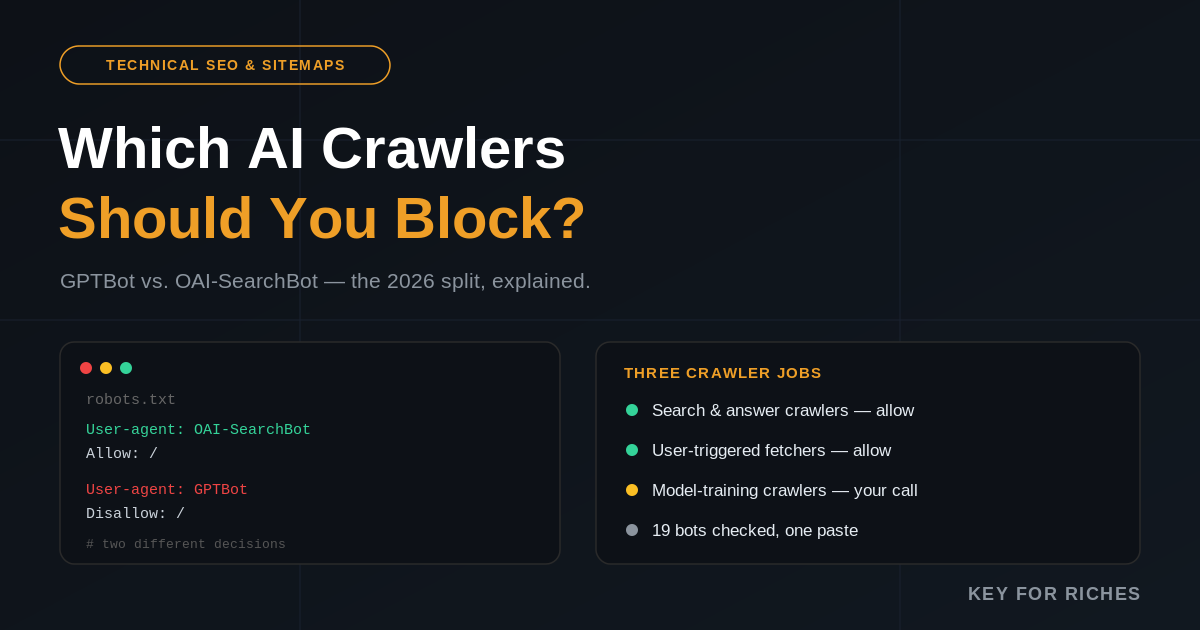
OpenAI, Anthropic, Perplexity, Google, Meta and Apple each run separate bots for separate jobs, specifically so that publishers can make independent decisions about each one. OpenAI's own developer documentation is explicit that you can allow OAI-SearchBot — the crawler that makes your pages eligible to be cited in ChatGPT Search — while disallowing GPTBot, the unrelated crawler that collects content for possible future model training. Copy a generic "block every AI bot" snippet and you block both at once, without ever deciding to opt out of ChatGPT visibility specifically. That's usually not the outcome anyone actually wants.
2. The Three Jobs an AI Crawler Can Have
Once you stop grouping crawlers by company and start grouping them by job, the landscape gets much simpler. Nearly every bot from a major AI vendor falls into one of three categories:
- Search & answer crawlers index or retrieve your pages specifically so they can be cited in a live, AI-generated answer. Blocking these is the one category that directly removes you from that product's answers —
OAI-SearchBot,Claude-SearchBotandPerplexityBotare the clearest examples. - User-triggered fetchers retrieve a single page the moment a person explicitly asks an assistant to open it —
ChatGPT-User,Claude-UserandPerplexity-User. These behave more like a browser acting on a human's direct request than a bulk crawler, and several vendors say robots.txt doesn't fully apply to them for exactly that reason. - Model-training crawlers collect content that may end up in a future model's training data —
GPTBot,ClaudeBot,meta-externalagent, and the usage-control tokensGoogle-ExtendedandApplebot-Extended. This is a forward-looking, separate policy call that, for most vendors, has no effect on whether you appear in today's AI answers.
A policy that just says "allow" or "block" everything can't express any of this nuance. A policy built around these three jobs can.
3. OpenAI and Anthropic: Three Bots Each, Three Different Rules
OpenAI's crawler documentation lays out the split plainly: GPTBot collects content that may train OpenAI's models, OAI-SearchBot is the separate crawler that indexes pages for ChatGPT Search, and ChatGPT-User fires only when a person asks ChatGPT to visit a specific URL mid-conversation. OpenAI states outright that a site which disallows OAI-SearchBot won't appear in ChatGPT's search results — direct confirmation that this bot, not GPTBot, is the one that actually controls your ChatGPT visibility.
Anthropic runs the identical three-way split for Claude. Per Anthropic's own support documentation, ClaudeBot is the training crawler, Claude-SearchBot indexes for Claude's search feature, and Claude-User retrieves a page for an active Claude user. All three are documented as independent agents that each respect their own robots.txt rule — so, as with OpenAI, you can keep Claude's search and user-retrieval bots open while declining the training crawler, without one choice forcing the other.
One data point worth knowing if you're deciding how seriously to take Claude's bots specifically: by mid-2026, independent crawl-log analysis from TechnologyChecker.io's ongoing Cloudflare-network report found Anthropic had grown from outside Cloudflare's top nine bot operators a year earlier to third place, at roughly 11% of all bot requests — with Claude-User alone the second-busiest bot on the internet that July, behind only Googlebot. That's a user-action bot, not a training crawler, which is exactly the distinction this guide is arguing for: the fastest-growing piece of Anthropic's traffic is people actively asking Claude to open pages, not bulk training collection.
4. Perplexity, Google, Meta and Apple
Perplexity draws its own line even more sharply. Its crawler documentation states that PerplexityBot supports search results and does not collect training data at all — there's no separate Perplexity training crawler to weigh against it. Perplexity-User handles the individual page fetches triggered by a person's question, and Perplexity says this one generally does not check robots.txt, since the request only happens because a human is actively looking at that page through the assistant right now.
Google is the exception that trips people up most. There's no separate "Google AI search" bot: ordinary Googlebot powers both classic Search results and AI Overviews, so blocking Googlebot removes you from both simultaneously. Google-Extended is a different kind of thing entirely — it doesn't crawl your site itself; it's a usage-control token that governs whether content Googlebot already crawled can help train future Gemini models and support some AI grounding features. Google states plainly that Google-Extended has no effect on Search ranking or AI Overviews eligibility, so disallowing it is a clean way to opt out of the training use case without touching your Search visibility either way — see Google's own crawler and fetcher documentation for the full list of its bots.
Meta and Apple follow the same pattern as OpenAI and Anthropic, just with two roles instead of three. Meta runs meta-externalfetcher for user-triggered retrieval and meta-externalagent for training collection. Apple runs Applebot — which indexes for Siri, Spotlight, Safari and Apple's AI answers — alongside Applebot-Extended, the control token that governs whether that same crawled data may train Apple's models. Block the -Extended token, leave the base bot allowed, and you land in the same place as the Google-Extended approach: visible in the product, opted out of training.
5. The Traffic Reality: AI Crawling Is Exploding, and Mostly Not for Search
The reason this distinction is worth the extra five minutes of robots.txt work is scale. Fastly's network-wide analysis of a fixed customer cohort from January through May 2026 found AI request volume growing roughly 30% over the period — about 6.5 times faster than human traffic — with Claude-related traffic alone up more than 555% from its January baseline. Crawlers accounted for 85% of AI bot requests in that data, versus 15% from user-linked fetchers, and more than half of all AI requests reached origin servers directly, compared with under 9% of human requests — meaning AI crawling is landing squarely on infrastructure that was sized for people, not bots.
Separately, TechnologyChecker.io's Cloudflare-network study of robots.txt directives found that across the whole AI-crawler population, roughly 89% of AI crawler traffic in its Q1 2026 baseline served training or mixed purposes rather than search — only about 8% was search-related, and just 2.2% was responding to an actual user query in the moment. That asymmetry is exactly why so many publishers now block training bots aggressively while leaving search-and-answer bots alone: a training crawl consumes bandwidth and never sends a human back to the site, while a user-triggered fetch usually means someone is actively researching something right now. The same report noted GPTBot as the single most-disallowed AI crawler by publishers, narrowly ahead of Common Crawl's CCBot and Anthropic's ClaudeBot.
6. Why "Allowed" in robots.txt Doesn't Guarantee Access
Robots.txt is a request, honored voluntarily by crawlers that choose to check it — nothing in the Robots Exclusion Protocol specification forces compliance. Reputable AI vendors generally say their bulk crawling and search-indexing bots do respect it, but the picture is murkier for the user-triggered fetchers: OpenAI notes ChatGPT-User requests may not always be subject to robots.txt checks, and Perplexity states outright that Perplexity-User generally ignores it, precisely because the fetch is triggered by an explicit human action rather than autonomous crawling. Less-formally-documented scrapers — Bytespider chief among them — are widely reported to disregard robots.txt in practice regardless of what it says.
There's also a layer robots.txt can't see at all. An Allow rule only removes a robots.txt restriction; the request can still fail at your CDN, firewall, application, or rendering layer. A site can look fully open in its robots.txt while actually serving a bot-detection challenge page, an empty JavaScript shell before hydration, or a flat 403 to the exact crawler it claims to welcome. If a bot you've allowed still isn't showing up in your server logs, the robots.txt file usually isn't the place to keep looking — check your CDN and WAF's bot-management rules instead, and verify traffic against the vendor's published IP ranges rather than trusting the user-agent string alone, since any client can copy that string.
7. Three Policies You Can Actually Choose
With the job-based framing above, most sites land on one of three coherent positions rather than a single blanket rule:
- Maximum AI reach. Allow every documented AI bot, including training crawlers. Reasonable if you want the broadest possible presence across AI products and have no objection to your content contributing to model training.
- AI-search visibility without training. Allow the search and user-fetch bots —
OAI-SearchBot,ChatGPT-User,Claude-SearchBot,Claude-User,PerplexityBot,Perplexity-User,Googlebot,meta-externalfetcher,Applebot— while disallowing the dedicated training crawlers and usage-control tokens. This is the position most publishers land on once they understand the split, and it's the default the tool below starts from. - Full opt-out. Block every AI bot you can name, accepting that you'll disappear from AI-generated answers as a trade-off for keeping content away from every training pipeline you're aware of, including the less-documented scrapers.
None of these is objectively correct — it depends on whether AI-referred traffic matters to your business and how you feel about training use. What matters is picking one on purpose instead of inheriting whatever a copy-pasted snippet happened to encode.
8. How to Check Your Current Setup and Generate a Policy
Most sites that have touched this at all did it once, added a handful of Disallow lines for whichever bots were making headlines at the time, and haven't looked at it since — even as vendors have split bots into narrower roles and added new ones several times a year. The fastest way to see where you actually stand is to paste your live robots.txt into a checker that knows the current bot-to-job mapping, rather than re-reading the raw file by eye.
Check yours with the AI Crawler Access Checker
Paste your robots.txt and see exactly which of 19 documented AI crawlers are allowed, blocked, or never addressed at all — grouped by search/answer, training, and other scraper bots. Then generate a ready-to-paste policy block from a recommended preset or your own custom picks. Free, no signup.
The tool checks your pasted robots.txt the way a real crawler would — matching an exact bot rule first, and only falling back to your general User-agent: * block when no specific rule exists — so it catches the common mistake of assuming a blanket wildcard block also covers every named AI bot by default. For the field-by-field breakdown of how the checker resolves conflicting rules and what each status label means, see the full checker guide. If you also need to rebuild the rest of your robots.txt — the general crawl rules, disallowed paths, and sitemap reference — the Robots & Sitemap Generator handles that half of the file.
Once your crawler policy is set, remember it's only the access layer. Whether AI systems actually cite you once they can reach your pages comes down to content quality signals this site covers elsewhere — see the E-E-A-T guide for what those signals are, and the AI Visibility Checker to see whether your brand is currently showing up in Claude and Google AI Overviews at all. And if you've also added an llms.txt file expecting it to move the needle on AI citations by itself, our honest look at llms.txt adoption is worth reading before you count on it.
9. Quick Answers
Will blocking GPTBot remove me from ChatGPT search results? No. GPTBot is OpenAI's training crawler; OAI-SearchBot is the separate bot that controls ChatGPT Search eligibility. You can block the first and allow the second.
Does blocking Google-Extended hurt my Google rankings or AI Overviews eligibility? Google states it does not. Google-Extended only controls whether crawled content can support future Gemini training and some grounding uses — ordinary Googlebot handles both Search and AI Overviews, and blocking Google-Extended leaves that untouched.
If I allow a bot in robots.txt, is it guaranteed to reach my pages? No. Robots.txt only removes one restriction layer. A CDN, firewall, bot-management rule, login wall, or JavaScript-only rendering can still block or empty out the response a "verified" crawler actually receives.
Should I bother blocking bots like Bytespider or CCBot? It's a reasonable stated preference, but treat it as weak. Several less-formally-documented scrapers are widely reported to disregard robots.txt in practice, so a hard requirement to keep them out needs enforcement at the CDN or firewall level, not just a text file.
How often should I revisit this? Every few months at minimum. Major AI vendors have split existing bots into narrower roles and introduced new tokens multiple times a year throughout 2026 — a policy that was complete six months ago may already be missing a bot that matters.